Smart Alarm for Shift Work: Schedule-aware alarms for rotating shifts
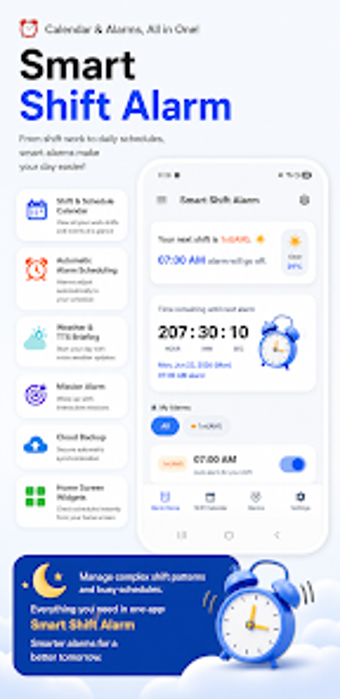
Smart Alarm for Shift Work, developed by coloring.max, addresses the scheduling challenges faced by professionals with nonstandard work hours. The app pairs a shift-tracking calendar with automated alarm synchronization so the correct alarms activate according to entered rotations. It offers quick one-time or recurring alarm setup, customizable snooze and tones, plus a memo field. Designed for nurses, emergency responders, factory staff, and anyone on rotating schedules, it reduces daily alarm management tasks.
How does Smart Alarm manage rotating shift patterns?
Smart Alarm asks the user to input work rotations and then applies those entries to its built-in calendar to drive alarm behavior. Users can enter common patterns such as 2/2 or 3/3 rotations and assign shifts to dates; the calendar then maps alarms to those dates. This approach converts a rotation schedule into a set of active alarms, so the app automatically updates which alarms are armed on any given day.
What are the device requirements and how it integrates with Android?
Smart Alarm runs on Android and requires a compatible OS version as listed on the app store. Because the app synchronizes alarm settings with the device clock and calendar, it operates with background scheduling to keep alarms current. Expect the app to write scheduled alarms into the system alarm service, which means it relies on the device's native alarm mechanisms rather than replacing them.
Is it safe to centralize shift alarms and notes in one place?
The app provides an integrated memo function for attaching notes to specific dates, consolidating shift details alongside wake-up events. Centralizing schedule data and alarms reduces the need for manual adjustments, a design choice that targets the error-prone step of resetting daily alarms. The developer focuses on niche scheduling utilities, so the app is built for this combined calendar-plus-alarm workflow rather than for generic reminders.
Do I need technical knowledge to configure complex rotations?
Configuration is aimed at practical use: the interface is designed for rapid schedule entry, and the app supports quick custom alarms for both one-time and recurring needs. Casual users who can describe their rotation pattern can enter it directly, while users with atypical cycles may need to map their shifts into the calendar manually. This makes the app suitable for typical shift workers rather than for automated roster import from external systems.
Practical choice for hands-on shift workers with manual schedules
Smart Alarm is a practical option for shift workers who need schedule-aware alarm management tied to their personal rotations. It depends on accurate, manual entry of shift patterns and runs on Android devices listed as compatible in the app store. Recommended for individuals willing to set up their rotation data, as it removes daily alarm fiddling and keeps wake times aligned with changing shifts.